Use the interactive API docs
Open generated, interactive OpenAPI docs for any flow from the inspector's API section, send test requests from the browser, and fetch the raw openapi.json for codegen.
View as MarkdownEvery flow you build gets generated, interactive API documentation: an
OpenAPI description of exactly how to invoke that flow over HTTP, rendered
in the editor as browsable docs with a built-in request runner. Open them
from the flow inspector's API section — the docs are generated from the
flow you currently have on the canvas, so they always match what's drawn.
You can also fetch the underlying openapi.json directly for client
generation or sharing.
Prerequisites
- A saved flow open in the editor, with at least one node on the canvas — the Open interactive docs button is disabled while the canvas is empty. Finish Build your first flow first if you don't have one.
- An API key, if you want to send test requests from the docs or fetch the
raw spec with
curl— see Create and manage API keys. Just browsing the docs needs no key beyond being signed in to the editor.
Open the docs from the flow inspector
- Open your flow in the editor and click an empty spot on the canvas so nothing is selected. The right-side Inspector panel shows the flow overview.
- Find the API section. It displays the flow's invoke endpoint:
POST https://api.axiomide.com/invocations/v1/flows/invoke, or…/v1/flows/invoke/streamwhen the flow runs in pipeline mode. - Click Open interactive docs. The button reads Compiling flow… while the editor compiles the current canvas into a compiled artifact and fetches its generated spec; then a full-screen overlay titled <flow name> — Interactive API Docs opens with the rendered documentation.
- Click the Close docs button (×) in the overlay header to return to the canvas.
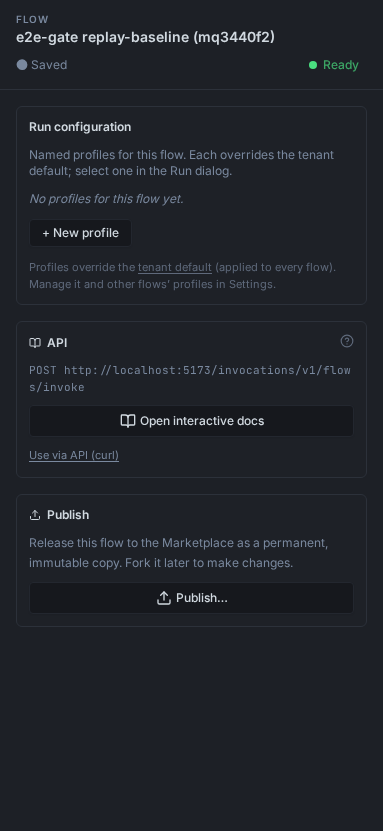
Opening the docs compiles the canvas first, so the docs can never describe a stale version of the flow — edit the flow and reopen the docs to document the new version. If compiling or fetching the spec fails, the error message appears under the button instead of an overlay.
The docs renderer (Scalar) loads from a CDN, so the overlay needs internet access to display.
What the docs describe
The docs contain one operation — POST /v1/flows/invoke for a flow in
unary mode, or POST /v1/flows/invoke/stream for a flow in pipeline mode —
with a complete, typed request and response schema and a pre-filled example
body:
| Body field | What the docs show |
|---|---|
graph_id | Pinned to the compiled artifact ID these docs were generated for, and pre-filled. Recompiling the flow produces a new ID. |
input | The entry node's input message as a JSON schema, field by field, with an example. |
wait | Unary mode only. When true, the call blocks until the execution completes and result is populated; when false, only execution_id is returned. |
timeout_seconds | Optional execution timeout in seconds. |
config_id | Optional flow config ID; when omitted, the defaults apply (tenant default → flow default). See Flow configs. |
For unary mode, the documented 202 response carries accepted,
execution_id, and (with wait: true) a result object whose output
schema is the terminal node's output message. For pipeline mode, the
documented 200 response is a Server-Sent Events stream
(text/event-stream) of frames carrying execution_id, frame_index,
payload, is_final, success, and error. Both variants document the
401 unauthorized and 500 failure responses and the bearer
authentication scheme.
If the terminal node's output schema can't be resolved — for example the node was deleted from its package — the docs still open, but the output is documented as a generic object.
Send a test request from the docs
The docs' built-in request runner sends real requests from your browser to
https://api.axiomide.com/invocations — the same gateway endpoint a curl or a
generated client uses, so a test request genuinely executes the flow.
- In the open docs overlay, set the Bearer authentication value to an API key (create one under Console → API Keys — see Create and manage API keys). The key must belong to the same account that owns the flow.
- The example body already has
graph_idpinned to the version of the flow you opened the docs from; fill in theinputfields and send. - A missing or invalid key returns
401with{"error":"unauthorized"}. A successful unary invoke returns202with the result inline — the same shapes documented on the page.
To invoke the flow from your own code instead, copy the ready-made command from Use via API (curl) in the same inspector API section — see Invoke a flow via API.
Fetch the raw openapi.json
The spec behind the docs is served as plain JSON on an authenticated route, useful for client generation or for tooling that consumes OpenAPI:
# Replace the ID with your flow's compiled artifact ID — the graph_id shown
# in the Use via API dialog and pre-filled in the interactive docs.
curl -H "Authorization: Bearer $AXIOM_API_KEY" \
'https://api.axiomide.com/api/graphs/01JX3F8Q4ZJ4M9W4Y0B8T2K7RD/openapi.json'- The response is an OpenAPI 3.0 document. Its
info.versionis the compiled artifact ID, and itsserversentry points at the invoke endpoint on the origin you fetched from. - A flow's input and output schemas are private to your tenant, so the
route requires authentication: a missing or invalid key returns
401with{"error":"unauthorized"}, and an artifact ID you don't own returns404. - Compiled artifacts are immutable, so the spec for a given artifact ID never changes. To document an edited flow, recompile (reopen the interactive docs or the Use via API dialog) and fetch the new ID.
View interactive docs for a marketplace package
Published packages have interactive API docs too, with one difference: package docs are public marketplace data, generated when the package is published.
- In the Marketplace, open a package's detail panel.
- Click Docs. An overlay titled <name>@<version> — Interactive Docs opens with one operation per node in the package.
No sign-in is needed to read package docs: the docs page is served at
/api/packages/<name>@<version>/docs and the raw spec at
/api/packages/<name>@<version>/openapi.json, both public. If the Docs
button is disabled with "No API spec stored for this package", the package
was published before specs were generated — republish it with the latest
axiom CLI. To build a typed SDK from a package, see
Build a client SDK.
Next steps
- Invoke a flow via API — the
ready-made
curlcommand and the full request/response walkthrough. - Create and manage API keys — mint the key the request runner and raw-spec fetch need.
- HTTP API reference — every endpoint, field, and error shape.