Manage secrets in a flow
Store an API key on the console's Secrets page, read it from node code with ax.secrets.get, and know exactly what is and is not encrypted.
View as MarkdownTo give a flow a credential — an LLM API key, a database connection string —
register it once as a secret in the console, then read it from node code with
ax.secrets.get("NAME"). Secret values are encrypted at rest, never shown
again after you save them, and decrypted by the platform only when an
execution starts. Node code never sees other tenants' secrets, and secrets
never appear in package source or flow definitions.
Prerequisites
- You are logged in to the Axiom app (Installation).
- To read a secret from code, you need a package with at least one node — see Your first node or the per-language guides such as Create a node in Python.
Add a secret in the console
- In the app, go to Console → Secrets (
/console/secrets). - Click Add secret.
- Enter a Name (for example
ANTHROPIC_API_KEY) and a Value. The value field is a password-style input with a show/hide toggle. - Click Save secret.
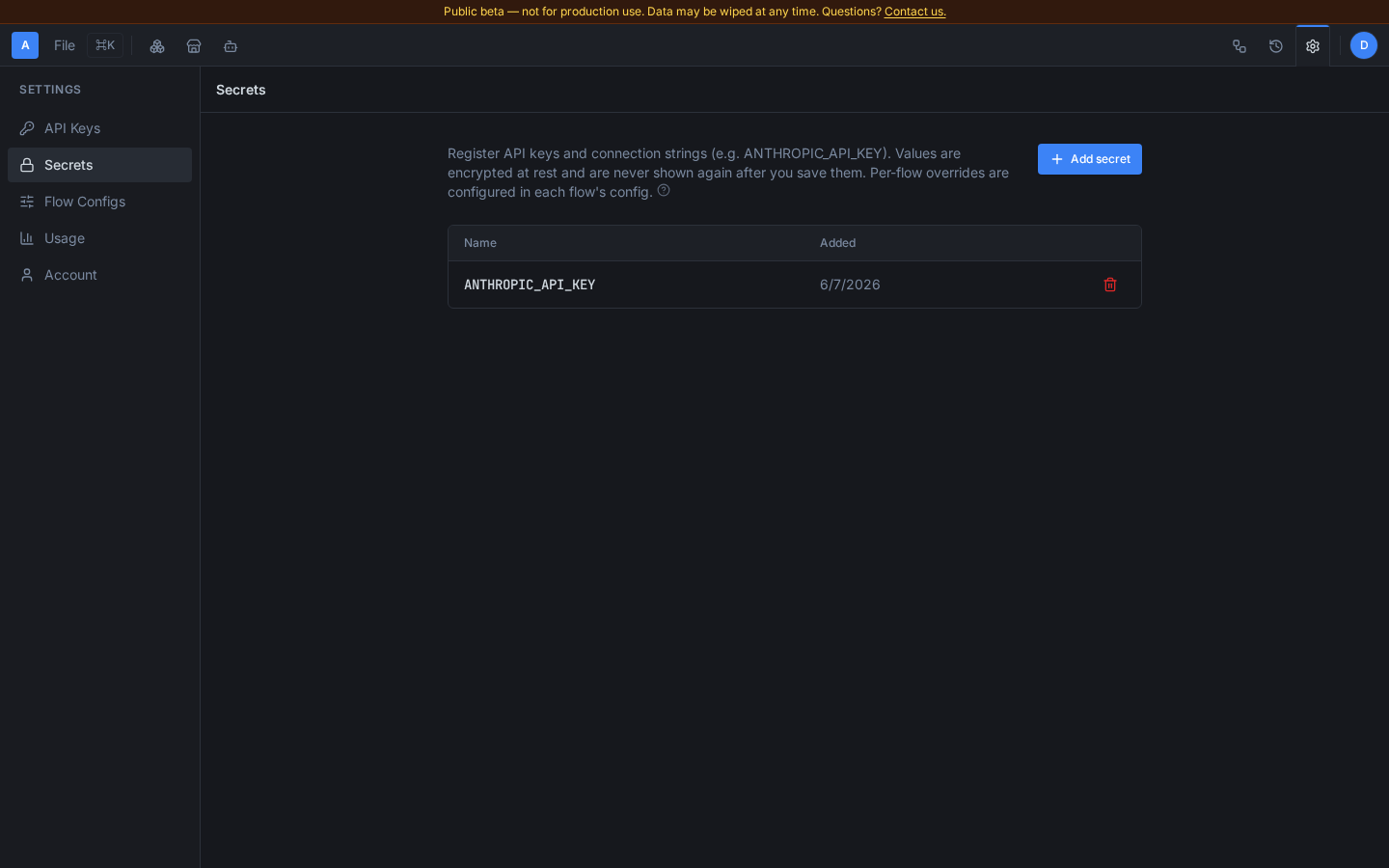
What to expect after saving:
- The value is never shown again. The secrets list displays only the name and the date added; no console page or API response ever returns a stored value.
- Saving an existing name replaces the value. The form warns you and requires an explicit I understand, replace it confirmation before it lets you overwrite.
- Deletion is immediate. The delete (trash) button on a secret's row removes it; the next execution will no longer see it. A node dispatched after the delete can tell "this was revoked" from "this was never configured" via the typed status accessor — see Distinguish revoked from never-configured below.
- Secrets are tenant-scoped, not per flow. Every secret registered here is readable by every node in every flow of your tenant. To give one flow config a different value, use a config-scoped override (see "Override a secret for one flow config" below).
Read a secret from node code
Inside a node handler, call the secrets accessor on AxiomContext. It
returns the plaintext value plus a found flag — a missing secret yields an
empty value and false, never an exception:
# nodes/greet.py — a node whose package defines GreetRequest/GreetReply
from gen.messages_pb2 import GreetRequest, GreetReply
from gen.axiom_context import AxiomContext


def greet(ax: AxiomContext, input: GreetRequest) -> GreetReply:
    """Greets the caller, signing with the tenant's configured signature."""
    signature, ok = ax.secrets.get("GREETER_SIGNATURE")
    if not ok:
        signature = "anonymous"
    return GreetReply(greeting=f"Hello {input.name}, from {signature}")
The same accessor exists in every SDK language:
| Language | Call form | Returns |
|---|---|---|
| Python | ax.secrets.get("NAME") | (value, ok) tuple |
| Go | ax.Secrets().Get("NAME") | (string, bool) |
| TypeScript | ax.secrets.get("NAME") | [value, ok] tuple |
| Rust | ax.secrets().get("NAME") | (String, bool) |
| Java | ax.secrets().get("NAME") | Optional<String> |
| C# | ax.Secrets().Get("NAME") | (string Value, bool Found) |
All of the tenant's registered secrets are resolved when an execution
starts, so a node can read any secret by name without per-flow wiring. In
unit tests, the generated test file for each node ships a mock
AxiomContext you can load with test values — for example, the Python
mock accepts secrets_map={"GREETER_SIGNATURE": "test-sig"}.
Distinguish revoked from never-configured
get() alone returns the same not-found result whether a secret was
deleted after the execution started or was never registered at all — there
is no way to tell "re-authorize this credential" from "this was never set
up" from that result. Use the status() accessor when your node needs to
react differently to the two:
status = ax.secrets.status("GREETER_SIGNATURE")
if status == SecretStatus.REVOKED:
    raise RuntimeError("GREETER_SIGNATURE was revoked — re-authorize it")
elif status == SecretStatus.UNSET:
raise RuntimeError("GREETER_SIGNATURE was never configured — see axiom.yaml")| Language | Call form | Values |
|---|---|---|
| Python | ax.secrets.status("NAME") | SecretStatus.{AVAILABLE,REVOKED,UNSET} |
| Go | axiom.SecretStatusOf(ax.Secrets(), "NAME") | axiom.SecretStatus{Available,Revoked,Unset} |
| TypeScript | secretStatusOf(ax.secrets, "NAME") | SecretStatus.{Available,Revoked,Unset} |
| Rust | ax.secrets().status("NAME") | SecretStatus::{Available,Revoked,Unset} |
| Java | ax.secrets().status("NAME") | AxiomContext.SecretStatus.{AVAILABLE,REVOKED,UNSET} |
| C# | ax.Secrets().Status("NAME") | IAxiomContext.SecretStatus.{Available,Revoked,Unset} |
Go and TypeScript expose status as a free helper (SecretStatusOf /
secretStatusOf) rather than a method on the secrets object; Rust, Java, and
C# add it as a default interface/trait method. Both forms are deliberately
backward-compatible — an existing node that only implements the secrets
get accessor keeps compiling (ADR-156).
AVAILABLE means get() will return a value right now. REVOKED means the
secret existed when this execution started but was deleted or rotated out
before this node was dispatched. UNSET means the tenant never registered
this name at all (or, for a node you don't own, that you're not authorized
to see it). get()'s own signature and return values are unchanged.
Declare required secrets in axiom.yaml
A node that reads secrets should declare their names in its axiom.yaml
entry so users know what to register before invoking a flow that contains
it:
# axiom.yaml
name: my-org/greeter
version: 0.1.0
language: python
nodes:
  - name: Greet
    input: GreetRequest
    output: GreetReply
    required_secrets:
      - GREETER_SIGNATURE
The marketplace displays required_secrets on the package listing.
axiom validate scans node source for secret reads and warns — it does not
fail — when a name referenced in code is missing from the list.
required_secrets is a DECLARATION, not an authorization. Declaring a
name tells the platform which slot a node wants filled; it does not entitle
the node to your secret. Since ADR-179 delivery additionally requires a
grant: an explicit, human-only record that you approved this secret
for this exact node version, made in the console after reviewing the node's
source. A published node that declares OPENAI_API_KEY receives nothing until
you grant it — even if you have a secret configured under exactly that name.
At compile/invoke time the platform collects every node's requirements
(including nested subflows) and fails closed with the complete list of
what is unauthorized, before the flow dispatches — so you resolve everything
in one pass instead of discovering the next missing grant on each re-run. The
refusal is the typed grant_required error; see
Secret authorization errors
for every reason and its fix.
Your OWN in-development (unpublished) nodes need no per-node grant — but they
deliver only from secrets you have armed for development on the Secrets
page, and an arming lapses after 7 days. That exists because axiom push is
gated by a credential, not by a human: without arming, anything holding your
CLI token could push code as you and read your whole vault.
Create and review a grant in the console
Every grant is created in the Grant Sheet, which shows the node's source (for an Instance, the bound generic's — the code that actually receives your secret) before you approve. That is deliberate: approving a grant is the one moment you judge third-party code, so it never happens from a bare list. You can reach the Grant Sheet three ways:
- From the Secrets page — click + Add grant on a secret, then search for the node the way you search the marketplace and pick it. You review its source and confirm on the next step; the secret you started from is preselected.
- From a node you're working with — the node's Secrets section in the editor, and the Run modal's pre-flight block, both link straight to the sheet.
- From a
grant_requirederror — a node invoked from the CLI, MCP, or the API that lacks a grant returns a typed error whose console link opens the sheet for exactly that node and slot.
Your secret's name does not have to match the slot — the grant carries the
mapping, so MY_CLAUDE_KEY can fill a node's ANTHROPIC_API_KEY slot.
You cannot grant a node that is unpublished (still in development) — a grant pins immutable code, and an unpublished node is still mutable, so the console refuses it. For your OWN in-development node you don't grant at all: arm the secret for development on the Secrets page instead (above), and it's delivered when the node runs. Publish a version if you want a pinned grant.
The Secrets page is where you see and manage grants: each secret's "Granted
to" column lists the nodes that hold it, naming each by its package/node@version
so you can tell what you are revoking, with a Revoke button. Revoking takes
effect the next time that node runs.
Sharing: any tenant can use a published connector with their own secret
A node — including a marketplace connector authored by someone else — is
delivered exactly the secrets it declares in required_secrets, from
your tenant's vault, once you have granted that secret to that node
version and configured a value. Who published the package is irrelevant: the
platform does not gate secret delivery on package ownership (ADR-170) — it
gates on your explicit consent to the specific code (ADR-179). The grant also
carries the NAME MAPPING, so your secret can be called MY_CLAUDE_KEY while
the node declares ANTHROPIC_API_KEY; you are no longer forced to name your
secrets after whatever an author chose. This is what makes the
marketplace's sharing model work — the author of a keyed connector (say, an
OpenAI or Stripe wrapper) declares the secret name
it needs; you configure your own key under that same name in your Secrets
page, and the connector authenticates as you, with your key, never the
author's.
Two consequences worth knowing before you configure a secret:
- Per-node scoping still applies. A node only ever receives the secret
names it declares — never your whole vault. A composed sibling node that
didn't declare
OPENAI_API_KEYnever sees it, even if another node in the same flow did. - Name-collision is intended, not a bug. If two different nodes in a flow both declare the same secret name, both receive it. Before you configure a secret and wire a connector into a flow, it's worth knowing what that connector's node actually declares and does with it — see Instance transparency: see what a connector does below.
Instance transparency: see what a connector does
An Instance connector (bound to a shared
Generic node — see Configure an Instance) can
declare its own required_secrets, exactly like an ordinary node's
axiom.yaml entry, so it can participate in the secrets mechanism. A package
author declares this with axiom instance create --required-secret NAME
(repeatable), or a required_secrets: [NAME, ...] list per node in a
--from manifest — see Configure an Instance.
Before you configure a secret for an Instance connector you didn't write,
axiom instance inspect <handle>/<package>/<node> shows you everything it
does with it in one view:
- the exact pinned generic node it runs as, and that node's real source code (an Instance carries no code of its own);
- the compiled request/response adapter mappings, in both directions — the request mapping is where a secret's destination (which header, which query param) becomes visible;
- the instance's declared
required_secrets.
axiom instance inspect nadia/openai/ChatCompletion
axiom instance inspect nadia/openai/ChatCompletion --json
This is a viewer, not an automated audit — it surfaces the facts (source
- adapters + declared secrets) so you can judge a connector for yourself before handing it a key. The same bundle is also surfaced in the marketplace website and the editor's node panel.
What is and is not encrypted
Encrypted at rest:
- Secret values saved on the Secrets page.
Config-scoped secret overrides— removed in ADR-179; a per-config value swap could silently redirect which key a granted node received.
Stored and displayed in plain form:
- Secret names and timestamps — they appear in the console list, so do not put sensitive data in a secret's name.
- Flow config parameters — config parameter values are not encrypted. Put credentials in a secret, never in an ordinary config parameter. See Flow configs.
At runtime, the platform decrypts values when an execution starts and
delivers them to node code only through the sidecar. The platform never
returns a value through the management API and never writes one to its own
logs or traces. After ax.secrets.get hands your code the plaintext,
hygiene is your code's responsibility: do not log a secret with ax.log,
copy it into an output message, or write it to agent memory — those surfaces
are not encrypted secret storage, and data placed there is visible in
execution and debug views. See
Sandboxing and tenancy for the
isolation model.
Override a secret for one flow config
A flow config can carry its own value for a secret name, replacing the tenant-wide value for executions invoked with that config:
- Go to Console → Flow Configs (
/console/flow-configs). - In a config's form, open Secret overrides — pick the secret name and enter the override value (same masked input as the Secrets page).
- Save the config. The list shows which names a config overrides — never the values.
Overrides are encrypted at rest like ordinary secrets and are scoped to the
one config that owns them. An execution invoked with that config reads the
override through the same ax.secrets.get call; node code cannot tell the
difference. See Flow configs for selecting a config at
invocation time.